Sample Intake Software for Environmental Labs
Smoothly and efficiently transition all the necessary intake information into a single, user-friendly platform — simplifying onboarding for your team and your customers alike.
Schedule DemoIntake without the headaches
Getting new sample intake has never been an easy task. Our environmental lab software streamlines the process so users can manage sample intake from start to finish on a single screen — no more switching between tabs or systems.
- Efficiency: consolidates all intake-related activities in one place.
- Clarity: clearly defined sections and fields prevent errors and ensure complete data collection.
- Compliance: DOH integration and detailed documentation tools support lab operators.
- Flexibility: accommodates various payment methods and customer scenarios.
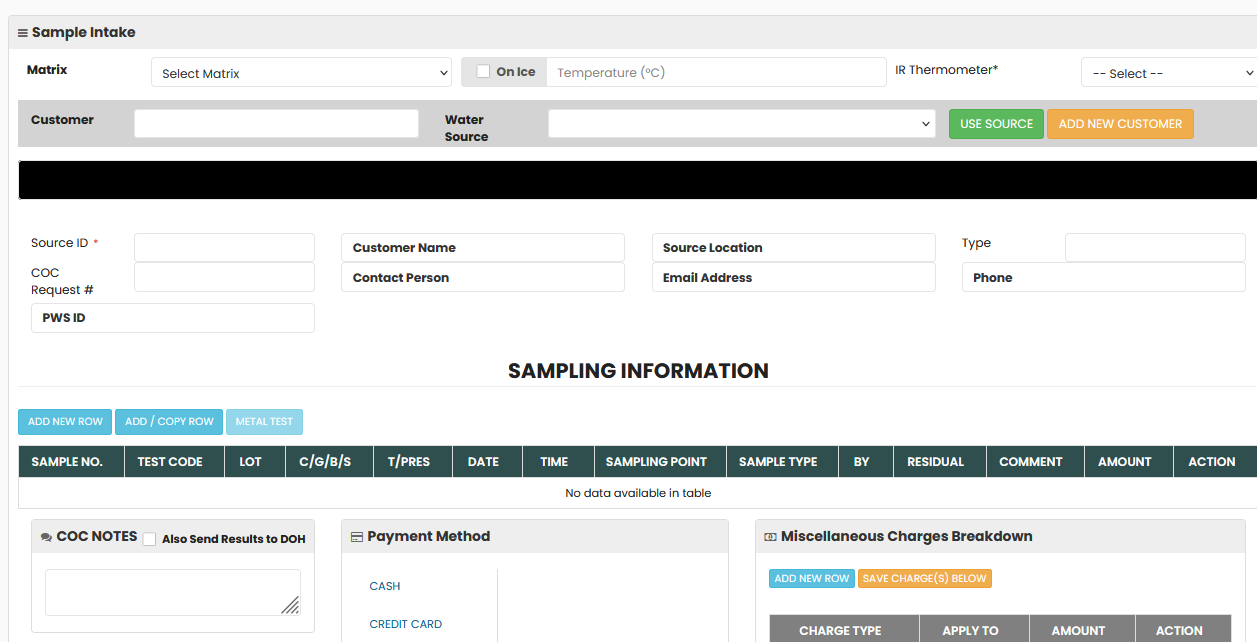
Everything on one intake screen
Customer Information Section
A clearly labeled section lets users quickly input or select customer details — customer ID, water source type, and related metadata. Buttons like "Use Source" and "Add New Customer" streamline the flow for new and returning customers.
Source Details
Essential sampling information (Source ID, temperature, equipment type, and more) is well organized for easy input. Dropdowns and pre-filled data keep critical details consistent and accurate.
Sample Data Entry
The tabular Sampling Information section lets users add, copy, and manage sample rows efficiently. Columns such as Sample Number, Test Code, and Sampling Point are intuitively laid out for fast entry and review.
COC Notes & DOH Options
A dedicated notes section with the option to send results to relevant agencies (e.g., Department of Health) adds operational flexibility and compliance assurance.
Payment Integration
Multiple payment options — Cash, Credit Card, Check, Courtesy, Send Bill — make it easy to record transactions. A Miscellaneous Charges Breakdown panel displays itemized charges, discounts, and payment statuses, reducing billing errors.
Streamlined Actions & Visual Feedback
Buttons for "Hold Samples," "Create COC," and "Preview COC" make task execution straightforward, while real-time indicators like "Amount Received" and "Balance" keep every transaction tracked accurately.
From the intake counter to a complete chain of custody
Sample intake is where data quality is won or lost. LabQuix guides your team through the same steps for every bottle, so nothing required for the chain of custody (COC), the certificate or the invoice is missed.
- Find or create the customer. Returning clients come up by customer ID with their water sources, public water system (PWS) IDs, contacts, special pricing and Department of Health (DOH) reporting requirements already on file.
- Choose the source. “Use Source” fills the source location, type and sampling details. Recurring sampling for predefined sources is handled with Bottle Pak.
- Record sample conditions. Enter the temperature on receipt and the equipment type. LabQuix monitors hold times so expired samples are flagged before they are accepted.
- Add the samples. Enter sample number, test code, sampling point, date and time, sample type and residual. Copy rows to log multi-bottle submissions quickly.
- Create the COC and take payment. One click creates the chain of custody, prints bottle labels and records the payment, with itemized charges and the remaining balance.
Built for regulated environmental labs
LabQuix validates COC data against TNI intake requirements and keeps “Relinquished By” and “Received By” records for full traceability. Pre-designed templates for water and food submissions help labs follow state and federal guidelines, such as NYSDOH requirements, and the DOH option sends results to the relevant agency when they are reported.
Because intake feeds every later step, the same record drives sample preparation, evaluation and certification, invoicing and the customer portal, so your team never types the same information twice.
Frequently asked questions
Does LabQuix support NELAC/TNI sample intake requirements?
Yes. LabQuix is NELAC/TNI compliant for Microbiology and Chemistry. At check-in it validates chain-of-custody data against TNI intake requirements, records the sample temperature on receipt and monitors hold times, so expired samples are flagged before they are accepted.
Can we take payment at the intake counter?
Yes. The intake screen records cash, credit card, check (ACH), courtesy, send-bill or card-on-file payments. Discounts and miscellaneous charges are itemized on the same screen, with the amount received and the balance shown in real time.
How does LabQuix handle recurring sampling clients?
Each client's water sources, public water system (PWS) IDs, sampling points and special pricing are saved on the customer record. “Use Source” fills those details in one click, and Bottle Pak support manages recurring sampling for predefined water sources.
Can results be reported to the Department of Health?
Yes. Select “Also send results to DOH” in the COC notes during intake, and results are reported to the relevant agency together with the client's email or text notification.
What happens to tests our lab doesn't run in-house?
Those tests are routed to a partner laboratory with a generated sub-out manifest. Results from external labs can be imported from XLS files, so they land on the same sample record.
Reduce the administrative burden on your lab operators
Smoother customer intake and sample processing workflows are one demo away.
Schedule Your Demo Now