Customer Portal for Environmental Testing Labs
Give your clients real-time visibility into their reports — with easy access to notes, prompt invoice settlement, and effective communication with your laboratory team.
Schedule DemoOptimized UI and UX for your highly valued customers
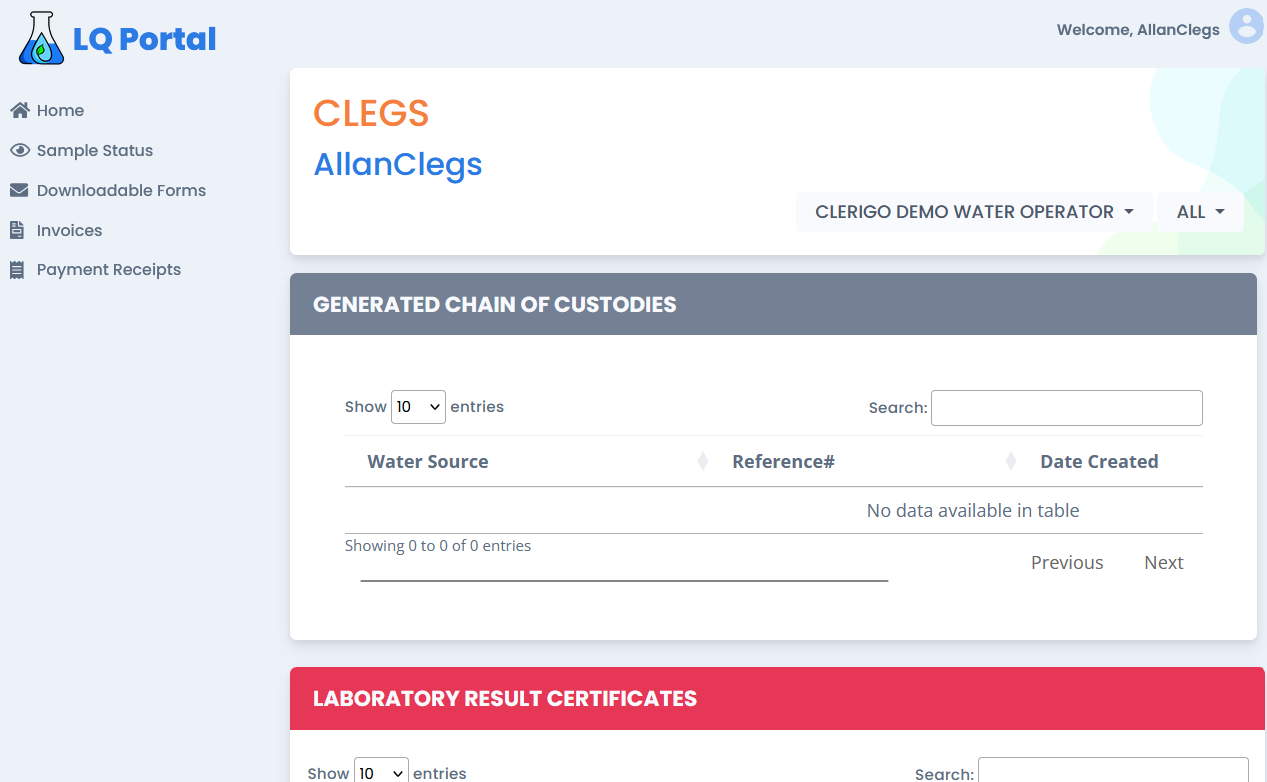
The portal provides a clear, intuitive interface for navigating sample statuses, downloadable forms, invoices, and payment receipts. The tabular format lets users quickly access and sort key information like reference numbers, water sources, and dates.
- Real-time sample status updates with timestamped entries
- Downloadable, customizable COC forms for water and food samples
- Direct invoice payment from the portal — no external platforms
- Centralized contact and results communication
Transparency and efficiency, end to end
COC Management
Automated Chain-of-Custody form generation tailored to sample types (water, food) with digital tracking of COC reference numbers for compliance and easy retrieval.
Real-Time Status Updates
Clients see sample statuses as they happen — for example "Shipped to Subout" or "Pending LCR" — with timestamps for when samples are received and processed.
Customizable Reporting
Forms and reports include sample point descriptions, disinfection methods, test requests, and customer-specific details like source names and addresses.
Regulatory Compliance
Pre-designed templates for water and food sample submissions help labs adhere to state and federal guidelines (e.g., NYSDOH, Florida legislation), with clear documentation for disinfectants and safety details.
Centralized Data & Record-Keeping
A consolidated view of all generated Chains of Custody with search and filtering. Digital storage plus "Relinquished By" and "Received By" logs provide full traceability.
Billing & Customer Empowerment
Clients view and download reports themselves, pay invoices directly in the portal, and receive automated reminders for unpaid invoices — accelerating cash flow and reducing routine requests to your staff.
A self-service portal for every lab client
Most calls to an environmental lab are status questions: Has my sample arrived? Are my results ready? How much do I owe? The LabQuix customer portal answers those questions automatically, so your staff can focus on testing.
- Live sample status. Every sample shows where it is, from In Transit to LCR Sent, with timestamps for when it was received and processed.
- Certificates and documents. Clients download certificates of results, reports and customizable COC forms for water and food samples whenever they need them.
- Invoices and payments. Clients view invoices, pay online and download payment receipts, with automated reminders for anything unpaid.
- Multiple sources and users. Water system operators, property managers and businesses with many sources see everything in one account, and administrators manage their own users.
Why labs offer a customer portal
A portal reduces routine phone and email requests, shortens the time between reporting and payment, and gives clients a professional, always-available view of their testing. Because the portal reads from the same LabQuix record as intake and billing, what clients see is always up to date.
New portal users can follow the step-by-step Customer Portal user manual.
Frequently asked questions
What can clients see in the LabQuix customer portal?
Clients see real-time sample status with timestamps (for example In Transit, For Preparation, Shipped to Sub-Out, For Evaluation, Pending LCR and LCR Sent), download certificates, reports and COC forms, view invoices and payment receipts, and contact the lab.
Can clients pay invoices in the portal?
Yes. Invoices can be paid directly in the portal with no external payment site, and automated reminders are sent for unpaid invoices, which helps labs get paid faster.
Does the portal support organizations with many water sources?
Yes. The portal handles multiple water sources and sample types, from wells to hospital cooling systems, and administrators can manage additional user accounts for their organization.
How are portal accounts secured?
Portal accounts are password-protected, with email verification and self-service password reset. Each client signs in to see their own samples, documents and invoices.
Is there a guide for portal users?
Yes. The step-by-step Customer Portal user manual covers navigation, sample status, forms, invoices, payments, receipts, documents and administrator accounts.
Scale to high-volume, multi-source operations
The portal accommodates multiple water sources and sample types — from wells to hospital cooling systems — making it ideal for labs with diverse operations.
Contact Us for Your Exclusive Demo