Lab Billing & Invoicing Software
A fully customized system that centralizes each aspect of the customer billing journey, so every team member can access and understand billing information at a glance.
Schedule DemoBilling as a team sport, minus the errors
Billing your customers often requires a collaborative effort within your laboratory. By consolidating the billing process on one platform, LabQuix minimizes errors and provides a seamless experience for your lab and your clients.
- Efficiency: automated invoice generation and multiple billing options save time and reduce manual errors.
- Transparency: detailed per-customer breakdowns reduce disputes and build trust.
- Customization: accounting notes, invoicing instructions, and flexible payment modes for every client.
- Compliance: COC data integrated with billing keeps documentation accurate.
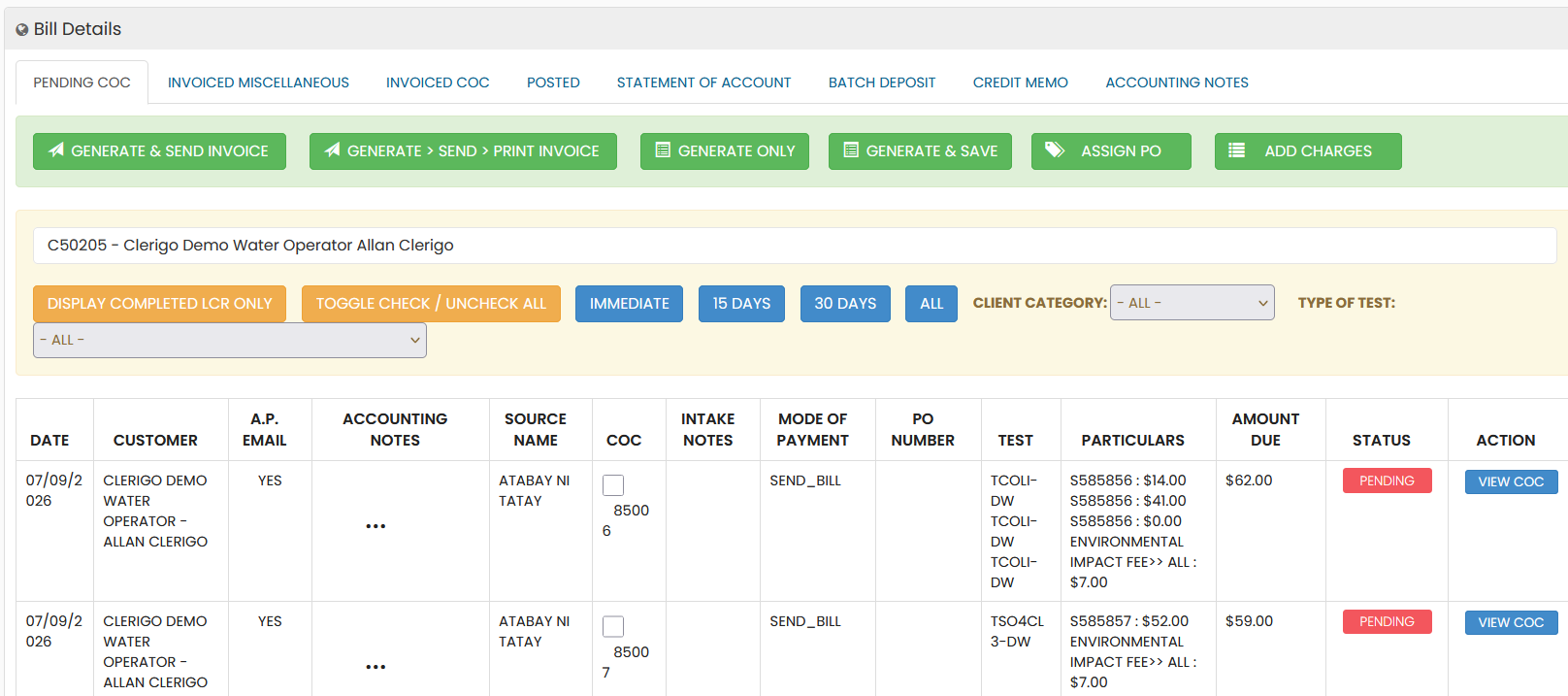
Every billing action, one interface
Action-Oriented Toolbar
- "Generate & Send Invoice," "Generate > Send > Print Invoice," and "Generate Only,"
- plus tools such as "Assign PO" and "Add Charges" for flexible workflows.
- Color-coded labels emphasize the right action.
Comprehensive Billing Overview
A tabular view of date, customer name, accounting notes, source name, COC details, payment method, and test information. Fields like "Particulars," "Amount Due," and "Status" give clear visibility into outstanding balances.
Filtering & Search
Filters for Immediate, 15 Days, 30 Days, or All, plus client category, test type, and customer search — locate any invoice without sifting through unnecessary data.
Customer-Specific Details
Clear categorization of customer notes — such as "Bill 30th only" or separate invoices for specific entities — supports tailored billing practices and compliance with unique customer agreements.
Payment & Status Tracking
The Mode of Payment column simplifies tracking payment preferences, while status indicators like "Pending" give immediate insight into each invoice and help prioritize follow-ups.
Quick Access to COC
A "View COC" button in the Action column links directly to the associated Chain of Custody document for easy reference and faster query resolution.
Lab invoicing that starts at the chain of custody
Billing errors usually start with missing information. Because LabQuix creates charges from the same chain of custody your intake team builds, every invoice matches the samples and tests the lab actually received.
- Charges are captured at intake. Tests, miscellaneous charges, discounts and the client's contract pricing are applied when the COC is created. Payments taken at the counter are recorded on the spot.
- Invoices are generated on your schedule. Generate and send, generate, send and print, or generate only. Filter by Immediate, 15 Days, 30 Days or All, and assign POs or add charges before sending.
- Clients pay online. Invoices appear in the customer portal, where clients pay directly and download receipts. Automated reminders follow up on unpaid invoices.
- Accounting stays in one place. Credit memos, batch deposits, aging reports and statements of account are built in, and every invoice links back to its COC with one click.
Reporting for the business side of the lab
Out-of-the-box reports cover intake analysis, sales by customer category, tests by revenue, new and lost customers and salesperson commissions. Export to PDF, Excel or Word, or email reports on a schedule so managers see the numbers without asking.
Billing is one part of a connected workflow. See how it fits with sample intake, the customer portal and the full LabQuix workflow.
Frequently asked questions
Can invoices be generated automatically from the chain of custody?
Yes. LabQuix generates electronic invoices from the COC number, so every charge is tied to the samples and tests on that chain of custody. You choose when invoices are generated and sent: immediately, every 15 or 30 days, or on a customer-specific schedule.
Can our clients pay invoices online?
Yes. Clients pay invoices directly in the LabQuix customer portal and receive payment receipts there. Card payments at the intake counter are processed through a third-party payment processor, so LabQuix does not store full card numbers.
Does LabQuix support customer-specific pricing?
Yes. Contract pricing and client discounts are stored on the customer record, and accounting notes such as “Bill 30th only” or separate invoices for specific entities keep special billing arrangements consistent.
Which billing and sales reports are included?
Built-in reports include aging, intake invoices, sales by customer category, tests by revenue, new customer tracking, lost customer analysis and salesperson commissions. Reports export to PDF, Excel or Word and can be emailed on a schedule.
Can statements and payment reminders be sent automatically?
Yes. Statements of account go out on the schedule you set, and clients receive automated reminders for unpaid invoices through the portal.
Minimize administrative overhead, maximize accuracy
See how LabQuix streamlines billing workflows for environmental lab operators.
Schedule Your Demo Today